
Vise Comp
Presets that fit your track.
Most compressor presets were set on someone else's audio. On yours they barely touch it, or they flatten it. Pick a preset in Vise Comp, play your track, and five seconds later it has set itself to do what the preset's name says. Then hit COMPARE and hear your original at the same loudness, so you're judging the sound, not the volume.
Pick a preset.
It listens first.
LISTEN
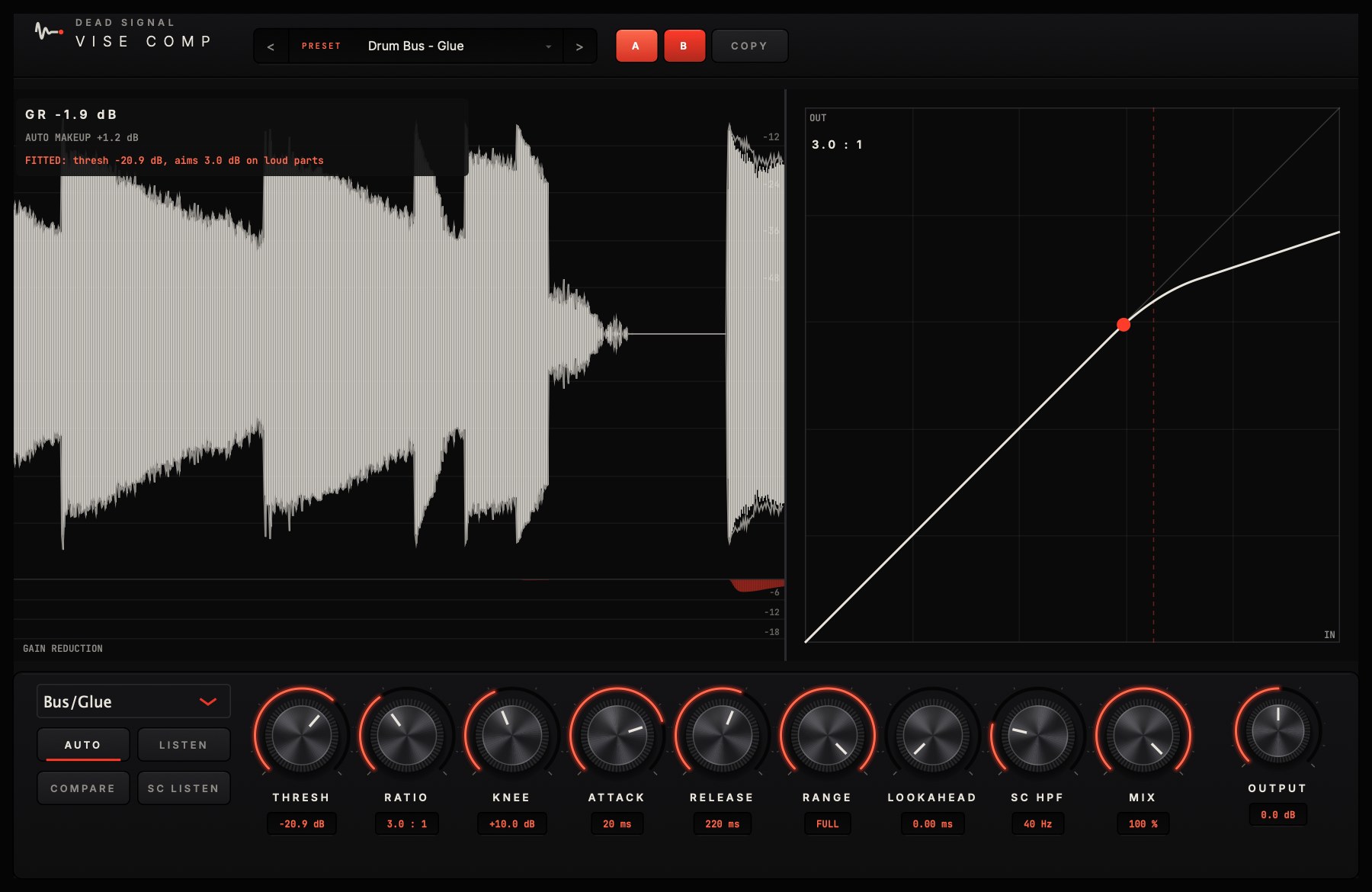
Every preset knows how hard it should work. Vise hears five seconds of your track (silence doesn't count) and sets the threshold so the loud parts get exactly that. Turn the threshold yourself and it's yours again.
COMPARE
One click plays your original at the same loudness as the output. Louder always sounds better for a second. COMPARE takes that trick away.
Makeup that doesn't lie
Auto makeup matches how loud it sounds, not how much it took off, so switching it in doesn't jump the level on you.
See it
A scrolling waveform with the gain reduction under it, the transfer curve with a dot riding it, and a line that tells you in words what LISTEN and COMPARE are doing.
Six styles
Clean, Classic, Opto, Punch, Bus/Glue and Mastering, each with its own timing and character.
Range and parallel mix
Cap the most it can ever take off, and blend the dry signal back in, for weight without flattening.
Lookahead and sidechain
Up to 10 ms of lookahead, a sidechain high-pass, SC LISTEN to hear what it's reacting to, and an external sidechain input for ducking.
30 presets, grouped by job
Vocals, drums, bass and guitar, the mix bus and mastering, EDM, heavy, plus A and B to compare two settings. Ratio 1:1 to 20:1, knee to 24 dB, attack 0.1 to 100 ms, release 10 ms to 2 s.
- Presets that actually do something. On raw drums from one of our songs, the Drum Bus - Glue preset at its saved threshold, the way compressor presets normally work, did nothing: 0.1 dB. After LISTEN it took 3.6 dB off the hits, right around the 3 dB the preset is built for. On a full mix, Mix Bus - Gentle Glue went from 0.1 dB to 2.1.
- Makeup you can trust. On a sung vocal, adding back the gain reduction (the usual auto makeup) came out up to 3 dB quieter than the original. Vise matches loudness instead: within 1 dB on every vocal, drum, bass and guitar track we tried.
- Measured, not guessed. On raw drums from one of our songs, Punch let the attack through: the hits stood out 2.0 dB more (peak to loudness 15.2 to 17.2 dB) at the same loudness. The video shows it.
- Same look as the rest of the paid line. If you know Vantage or Crucible, you already know where everything is.
Vise Comp and Lathe EQ.
Better together.
Vise Comp comes out December 8, alongside Lathe EQ. Vise Comp is $39, or get both for $79 (launch week: $69). Get an email that day, plus the free Heavy Mix Cheat Sheet right now.